Disclaimer: This is an independent learning project and is not affiliated with or endorsed by Zotero or its developers. Always check the official Zotero documentation for the latest instructions.
Organize with collections and tags
What you’ll do
By the end you’ll have a collection with at least 10 items — milestone M2 — plus tags you can filter by, and no duplicate items.
Why it matters
Collections are how you find things in month 3. And duplicates are the quiet tax of saving from multiple databases: the support analysis shows “find and merge duplicates” recurring as a question until it’s shown once (duplicate detection in the official docs).
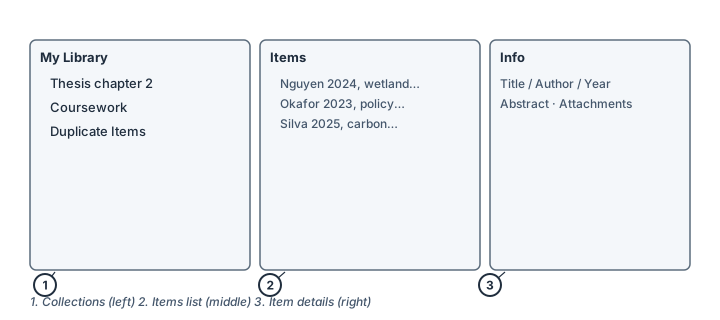
The three columns: collections (1), items (2), item details (3). Illustration, not an actual screenshot.</figcaption> </figure>
Steps
- Create a collection: click New Collection… above the left column (or right-click My Library → New Collection…). Name it after the project — “Thesis chapter 2” beats “misc”.
- File items: drag items from the middle column onto the collection. An item can live in several collections without being copied — collections behave like playlists, not folders.
- Tag by theme or status: select an item and add tags in the right pane’s Tags tab, e.g.
to-read,methods,cite-in-intro. You can filter by multiple tags in the tag selector at the bottom left. - Color your workflow tags (optional): right-click a tag in the tag selector → Assign Color…. Up to 9 tags get colors and number-key shortcuts (press
1–9with an item selected). - Merge the duplicates: click Duplicate Items in the left column. Zotero pre-selects likely duplicates; check the fields, pick the best version as the master, and click Merge N Items. Merging keeps the collections and tags of both items; deleting doesn’t.
Check it worked
- Your collection holds ≥ 10 items (click the collection to count them).
- The Duplicate Items view is empty — or you know how to clear it after every big import.
If it didn’t work
- An item “disappeared” from the library after filing — it’s still in My Library; you added it to a collection, which doesn’t move it.
- Zotero offers to merge two items that aren’t duplicates — don’t merge; detection is a suggestion, not a verdict (official docs note you can’t mark false positives yet, so just leave them).
- Still stuck → troubleshooting tool or the official docs on collections and tags
Last verified against Zotero 10.0.6 documentation on 2026-10-25. Zotero's interface changes between versions — if a step does not match what you see, check the official documentation linked above and report the lesson via the “Report an outdated lesson” issue template.