Disclaimer: This is an independent learning project and is not affiliated with or endorsed by Zotero or its developers. Always check the official Zotero documentation for the latest instructions.
Install the word processor plugin
What you’ll do
By the end you’ll see the Zotero tab in your word processor’s ribbon — the setup step for milestone M3, your first citation.
Why it matters
Citing without the plugin means typing references by hand and re-formatting them at 2 a.m. before a deadline. The plugin is bundled with Zotero and installs automatically — but on managed work laptops it often needs a nudge, which is exactly what this lesson is for.
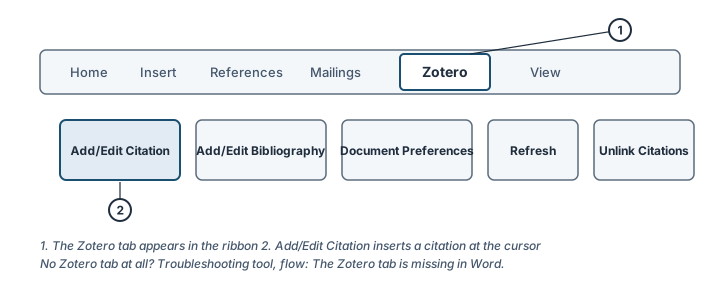
The Zotero tab in the Word ribbon (1) and its most-used button (2). Illustration, not an actual screenshot.</figcaption> </figure>
Steps
- Open Zotero first. The plugin needs the desktop app running to communicate with your document.
- Open Word (or LibreOffice) and look for the Zotero tab in the ribbon. On Google Docs, the Zotero menu loads through the browser connector instead — no separate install.
- Tab missing? Reinstall the plugin from inside Zotero: in Zotero’s Settings → Cite → Word Processors, click Install Microsoft Word Add-in (the exact button name matches your word processor), then fully quit and reopen Word.
- Still missing on a Mac? In Word, check Tools → Templates and Add-ins… and confirm Zotero.dotm is listed and ticked under Global Templates and Add-ins.
- Work laptop that blocks add-ins? The cause differs by platform:
- macOS: the common case is a missing permission — Zotero needs permission to control Word (the managed-laptop case most common in the support data). The flow’s Mac branch walks the System Settings grant step by step.
- Windows: the add-in may be disabled by Word’s Trust Center or by IT policy. The flow’s Windows branch covers Disabled Items and Trust Center settings — and if IT policy blocks it, only IT can whitelist Zotero.
Check it worked
The Zotero tab (Word/LibreOffice) or Zotero menu (Google Docs) is visible, and clicking Add/Edit Citation opens a search dialog rather than an error.
If it didn’t work
- Tab still missing after reinstall → troubleshooting: The Zotero tab is missing in Microsoft Word
- Word says “Word could not communicate with Zotero” → confirm the Zotero app is open, then use the same flow
- On macOS, Zotero can’t control Word → troubleshooting flow 3, which covers the permission grant step by step
Last verified against Zotero 10.0.6 documentation on 2026-10-25. Zotero's interface changes between versions — if a step does not match what you see, check the official documentation linked above and report the lesson via the “Report an outdated lesson” issue template.