Disclaimer: This is an independent learning project and is not affiliated with or endorsed by Zotero or its developers. Always check the official Zotero documentation for the latest instructions.
Install Zotero and the browser connector
What you’ll do
By the end you’ll have the Zotero desktop app running and the Zotero Connector in your browser — the two pieces that make saving sources possible.
Why it matters
Zotero is really three pieces: the desktop app (your library), the browser connector (saves what you’re looking at), and the word processor plugin (cites into documents, covered in the Writing with citations path). Most “the save button is missing” problems trace back to one of these pieces never being installed.
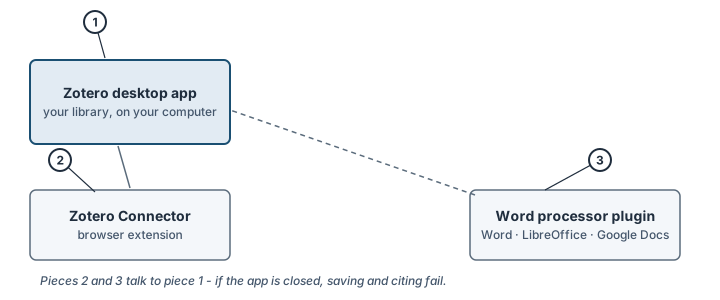
Pieces 1–3 and how they talk to each other. Illustration, not an actual screenshot.</figcaption> </figure>
Steps
- Download the app. Go to zotero.org/download and click Download. Zotero works on macOS, Windows and Linux.
- Install it. On macOS, open the downloaded
.dmgand drag Zotero into your Applications folder, then eject the.dmg. On Windows, run the installer. - Open Zotero. Launch it from your Applications folder, Start menu, or launcher. You do not need an account for steps 1–4 of this path (an account matters for sync — see lesson 9).
- Install the browser connector. On the same download page, click Install Zotero Connector for your browser (Chrome, Firefox, Edge or Safari) and confirm the browser’s prompts.
- Pin the button (optional, saves time). In Chrome or Edge, click the puzzle-piece/extensions icon and pin Zotero so the save button is always visible.
Check it worked
- The Zotero app opens to a window with three columns (left: My Library; middle: items; right: details).
- Your browser shows a Z button in the toolbar (in Safari: check Settings → Extensions and confirm Zotero Connector is enabled).
If it didn’t work
- No Z button in the browser toolbar → troubleshooting: The Zotero save button doesn’t appear in my browser
- The connector says “Zotero is unavailable” when you click save → troubleshooting: Saving fails
- The app itself won’t open → official troubleshooting page, then the Zotero forums with a Report ID
Last verified against Zotero 10.0.6 documentation on 2026-10-25. Zotero's interface changes between versions — if a step does not match what you see, check the official documentation linked above and report the lesson via the “Report an outdated lesson” issue template.